

Unity5: How to Save Time With Digital Parking Permits Software

Parking Managers face increasing pressures to save time, reduce costs and streamline their operations. A reliable digital parking permits management system is the smart way to handle permit requirements.
Smarter permits start here. Transform your permit process with Zatpermit. Our mobile-ready platform puts seamless parking control in your user’s hands, streamlining approvals and eliminating administrative burden across your organisation.
Unity5 delivers industry-leading software across compliance, enforcement, and permitting. Zatpermit is a comprehensive digital permit management system leveraged by over 150 local authority customers, in addition to universities and hospitals – driving transformative efficiencies across their organisations. The system enables complete, real-time control over the entire permit lifecycle, seamlessly underpinned by a robust and integrated cloud-native infrastructure.

These are the benefits and features that parking managers are frequently seeking:
- A one-stop digital permits portal
- Self-serve permit applications
- Configurable rules & tariffs
- A wide range of permit types
- The ability to make exemptions
- Clear and easy data reports
Unity5 delivers industry-leading software across compliance, enforcement, and permitting
Zatpermit is a comprehensive, mobile-ready digital parking permit management system leveraged by over 150 local authority customers, in addition to universities and hospitals, driving transformative efficiencies across their organisations. The system enables complete, real-time control over the entire permit lifecycle, seamlessly underpinned by a robust and integrated cloud-native infrastructure.

Local authorities are using digital permits to offer guaranteed parking spaces for motorists that need it.
The best way to modernise the Permit Process
Driving efficiency and customer satisfaction, Zatpermit focuses on four core operational pillars:
- Accelerated permit issuance
- Data-driven insights
- Automation for optimised compliance and review
- Improving first-time permit approval rates
A highly configurable solution eliminates delays
Zatpermit is a digital, highly configurable permit management solution that covers the end-to-end permit lifecycle. The system is entirely flexible, allowing for a wide range of custom permit types tailored to your community’s needs, such as: residents, visitors, staff, multi-use, and business.
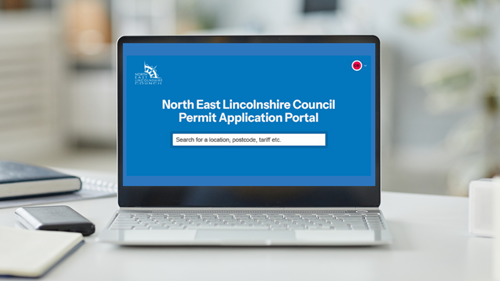
Councils are using Unity5’s Zatpermit to speed up permit applications with a branded portal for motorists.
A mobile-friendly self-service model speeds up permits issuance
Zatpermit is driven by secure, permission-based access. It leverages an intuitive, account-led structure to segment users into precise groups, ensuring that only eligible individuals can view and apply for specific permit types.
Jimmy Hampton, Product Manager at Unity5 says:
“By shifting to this dynamic, mobile-friendly self-service model, customers obtain their permits significantly faster without administrative delays. Comprehensive online applications capture valuable data, enabling deep analysis to track parking trends and optimise local resources.Simultaneously, intelligent automations eliminate unnecessary manual checks, drastically improving first-time permit approvals, reducing frustrating back-and-forth correspondence, and ultimately freeing your staff to focus on strategic activities rather than routine processing.”

The permit portal offers a mobile-friendly experience for residents, visitors, students and businesses.
An easy to use Applicant Portal means happy residents and visitors
The Zatpermit online applicant portal allows users to apply and pay for digital parking permits. The portal is fully mobile responsive and can be accessed through a range of devices, including desktop, tablet or smartphone. Applicants can use the system for the following:
Apply for permits, licences and more
Easily browse, select, and apply for various parking permits, licenses, and local authorisations directly from your mobile device.
Apply for and use visitor vouchers
Quickly request, manage, and activate digital visitor vouchers in real-time, ensuring hassle-free parking for your guests anytime, anywhere.
Make a payment
Securely process payments for permits and vouchers using integrated, fast, and globally recognised mobile payment methods on the go.
Submit proof documentation
Seamlessly upload photos or digital copies of required identity, address, or vehicle documents straight from your smartphone’s camera roll.
Send correspondence
Communicate directly with operators and organisations, submit support queries, and receive updates regarding your permit status through secure messaging.
Manage their accounts
Take full control of your profile by instantly updating vehicle registrations, contact information, personal details, and custom notification preferences.
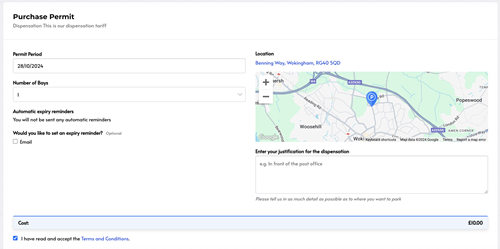
Permit applicants can access an easy to use portal to apply for and set up their permits, complete with active maps.
The Back-Office Portal makes life easier for staff
Zatpermit enables back-office users (depending on their user administration permissions) to create an infinite number of permit types. The system is highly intuitive and has been designed to enable automations providing simple and streamlined scheme administration for users.
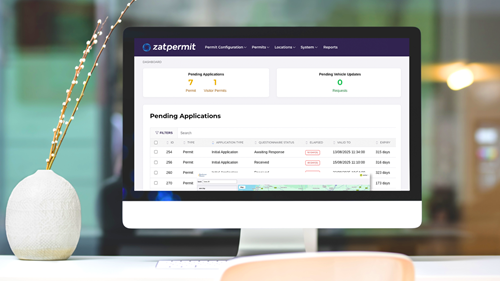
An example of the Zatpermit Back Office with pending permit applications.
The digital parking permit builder provides an advanced level of configuration that can be combined with the universal questionnaire builder. This helps with qualifying applicant eligibility and ensures the right people are prioritised in being allocated a parking permit. The rules engine can be easily managed by the customer directly within the back-office, and any changes can be adopted in real-time onto the live customer application portal website. Key features include:
Eligibility Mapping
- User groups (such as residents, students, staff or businesses) are mapped to specific permit types based on configurable rules. For example, a student account may only see “University Permits, while a resident account only sees “Zone-specific Permits”.
Admin Permissions
- Back-office access is also segmented. Administrators can be assigned to specific workflow queues based on their user group permissions, allowing teams to focus exclusively on specific application types, such as “Student faculty”.
Custom Portals
- Organisations can provide standalone landing pages or customised applicant portals for different business partners or departments, each with its own branding and specific application forms.
Intelligent Automation
- These customisations work in tandem with the Auto-Approval functionality. By setting specific “weighting” for responses in the custom application forms, the system can automatically grant permits to qualified user groups without manual intervention, while flagging high-risk or complex applications for human review.
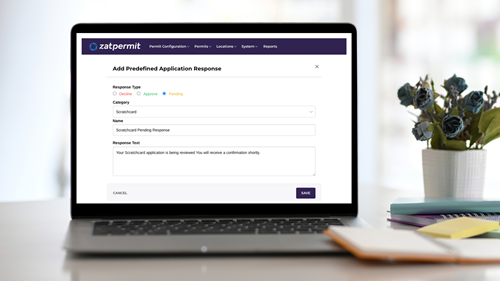
An example of configurability in Zatpermit with the ability to add predefined application responses.
The Top 10 configurations that are giving parking managers full control
1.Permit Type Selection
Examples are residential, staff, business, student, multi-use, temporary, fleet and event.
2. Date and Time Parameters
Establish permit start dates (based on user input, purchase date, specific calendar date, or payment receipt) and define specific active hours; annual renewal capability is included.
3. Cost and Term Configuration
Define permit cost (including zero-cost options), available quantity, and coverage period, supporting multiple durations within a single permit.
4. Rule-Based Discounts
Configure and apply discounts using eligibility rules, such as matching registered post codes or other specified account conditions.
5. Availability Control
Define specific purchase availability windows, or set as perpetually available until manually inactivated. Offset dates allow a predetermined start delay, with applicant-specified range limits.
6. Renewal Options
Specify if renewal options are offered upon expiration, including the possibility of automatic renewals and setting a maximum renewal limit.
7. Purchase and Account limits
Establish restrictions on the maximum number of permits an applicant can purchase per transaction and hold simultaneously under their account.
8. Application approval settings
Configure for either mandatory manual review or automated approval, with auto-approval functionality driven by eligibility scores from linked questionnaires.
9. Cancellation Management
Allow for active permit cancellation and configure automatic cancellation for unpaid permits after a defined period.
10. Evidential Requirements
Define mandatory evidence for permit validation, including configurable requests, help text, and specifications for accepted document formats and file sizes.

Time-saver: administration teams are saving time with fast permit issuance and no longer have to replace lost or stolen permits.
A trusted permit solution
“I just wanted to say a huge thank you for rolling out the Zatpermit system. We’ve already received four pieces of positive feedback in the first week. It’s been a massive weight off my shoulders and the team’s, especially now that we’ve stopped taking manual payments over the phone. Your support has made a real difference.”
Hiba Butt, Team Leader – Residents Service, London Borough of Redbridge Council
 About Unity5
Unity5 is the creator of Zatpark - SaaS Solutions For Parking, Enforcement and Environmental Management - Designed for private parking companies and public sector bodies, Zatpark delivers world-class features completely controlling and automating the full lifecycle of parking enforcement data, from issue to recovery action and every step in-between. Built-in ANPR, Moving Traffic Violation Management and dedicated Permit and Kiosk solutions, Zatpark, Zatmobile, Zatpermit, Zatenviro, and Zatpark Flexible Enforcement provide end-to-end management of all your PCN and FPN activities.
















Comments
There are no comments yet for this item
Join the discussion